



Key Highlights
- Claim and fully complete your Google Business Profile - every field matters, including your description, photos, category, Q&A, and hours of operation, because incomplete listings leave ranking potential on the table.
- Use location-based keyword research tools to find the terms your local customers are actually searching, then weave those keywords naturally throughout your GBP listing.
- Your business name, address and phone number (NAP consistency) - must match exactly across every directory listing, your website and your GBP, because conflicting information can actively hurt your local search performance.
- Embedding a Google Map on your website's contact page reinforces to Google that your business is located where your listing says it is, supporting your overall local SEO optimisation strategy.
In this article, we'll show you how to increase visibility for local service businesses by improving your Google Maps ranking.
Imagine if you could get your business to show up in the top 3 of the Google Maps rankings! You'd probably get more phone calls, more clicks to your website and more paying customers looking to buy the products and services your business sells.
How good would that be? Pretty good, we'd say!
Google Business Profile (GBP) listings are important features that can help increase your website ranking on the search engine results page (SERP). They can also increase your business reputation, enabling customers to both find and trust your business.
In this article, we're going to show you what you need to do to boost your Google Maps ranking through strategic local SEO optimisation.
Step 1: Research Location-Based Keywords to Optimise
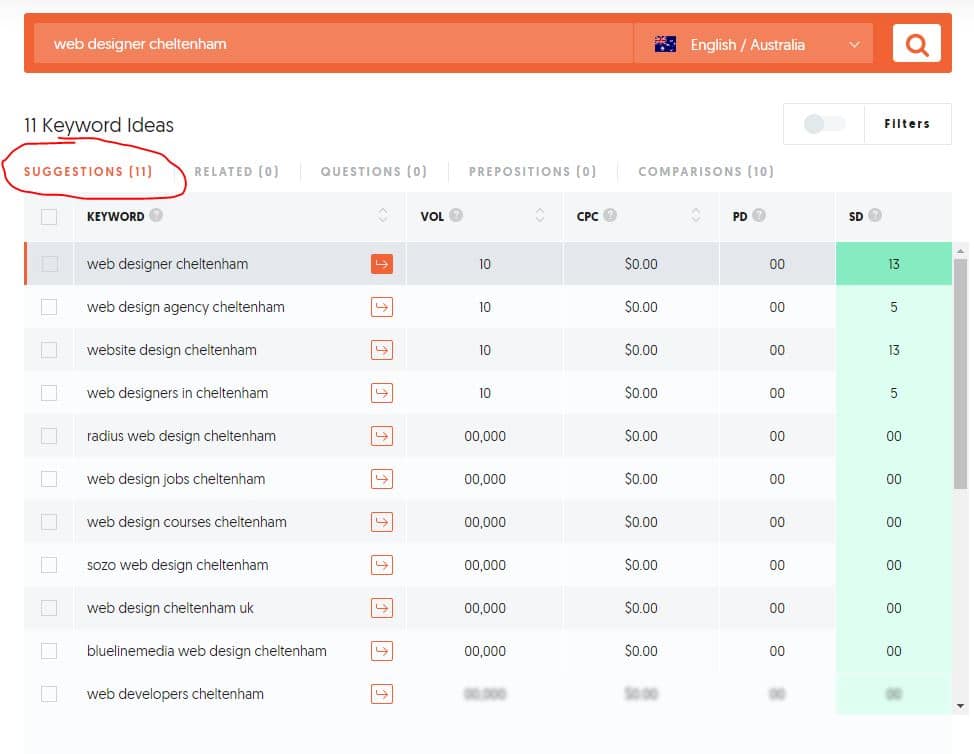
Firstly, you need to find out what keywords consumers are using to find products and services where your business is located. We can find these location-based keywords using a keyword research tool, such as Ubersuggest (free) and Google Keyword Planner, to get a list of relevant keywords to include throughout your GBP listing.
For example, if you are offering website design services in Cheltenham (like us), then you might use a seed search term like "web designer Cheltenham". When you go to the bottom of a Google search, you'll find a list of keywords suggested by Google. These keywords are terms that most people within your area search when looking for products and services related to your niche.
Keyword Research Checklist:
- Use location + service combinations
- Check Google's "People also search for" suggestions
- Note search volumes and competition levels
- Compile a list of 10-15 relevant business information for local business searches
Step 2: Google My Business Listing Optimisation
It's important to ensure that all information in GBP is accurate and complies with Google's business guidelines. How you optimise your GBP will determine your local ranking. Therefore, it's important to ensure that every detail you provide is accurate and well-optimised for the keywords you'd like to rank for.
Below is what you need to do to optimise your GBP listing for effective Google Maps optimisation.
Claim Your Business Listing
The first crucial step to optimising your GMB listing is claiming your GMB profile. Remember that anyone can list your business on Google. Therefore, it's important to claim your listing to get the right to manage reviews as well as post and edit crucial information.
Google's algorithm keeps changing, so ensure you stay up to date with Google updates and make changes to your listing when necessary to maintain good ranking.
To claim your GBP listing, go here: https://www.google.com/intl/en_au/business/
Complete Your GMB Profile
This is arguably the most important step in GBP optimisation. Ensure that you fill every field on your GBP listing completely, including your business name, phone number, address, website, category, hours of operation, attributes, Q&A, descriptions, and photos.
When filling out the information, your aim should not be to meet the minimum requirements set by Google. Instead, you should optimise each field by including a mixture of keywords we found in step 1 to make your listing appear for these searches.
Optimise Your Description
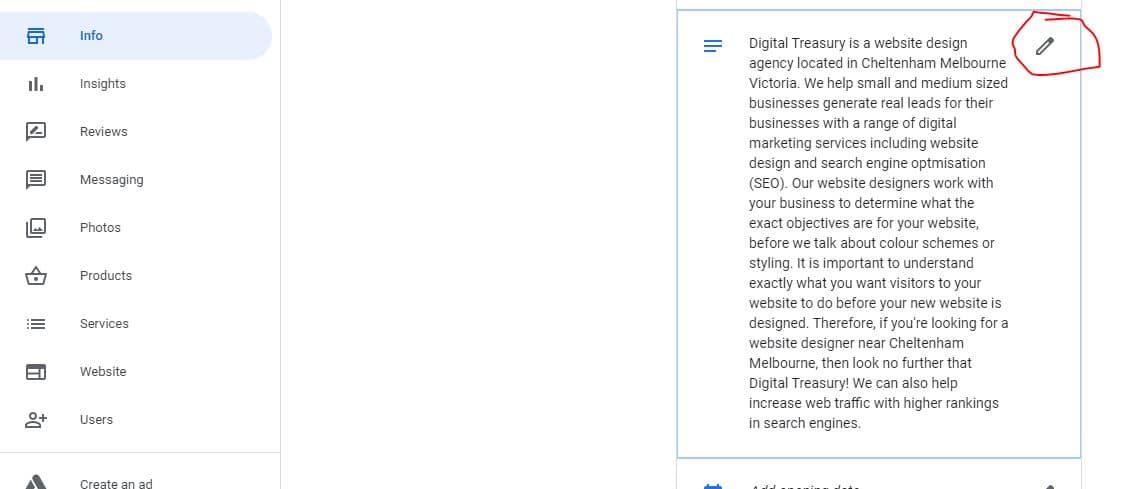
The description included in your GBP profile should add more value to your listing. Description optimisation means adding your main keywords and highlighting crucial features that will attract customers. You only have 750 characters, so use them wisely. Also, remember that only 250 characters will be seen in the knowledge panel that appears in Google searches.
Description Writing Tips:
- Include your primary service keywords naturally
- Mention your location and service areas
- Highlight unique selling points
- Keep the tone professional but approachable
Choose the Right Category
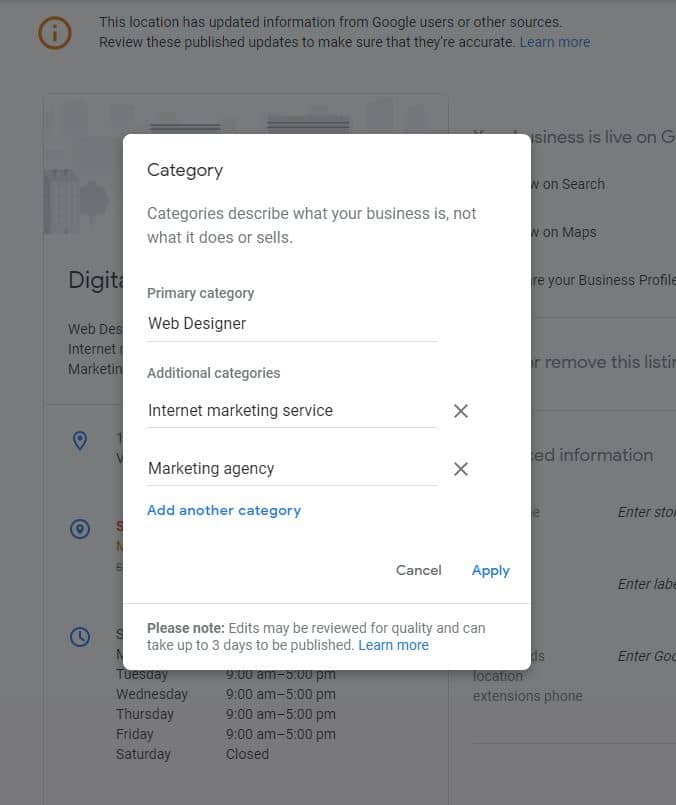
Having your business listed under the correct category will help customers locate your business easily in non-branded searches. The category for a professional website designer like Digital Treasury would be "Web Designer". Make sure you find the closest match to your industry, as this significantly impacts your SEO optimisation efforts.
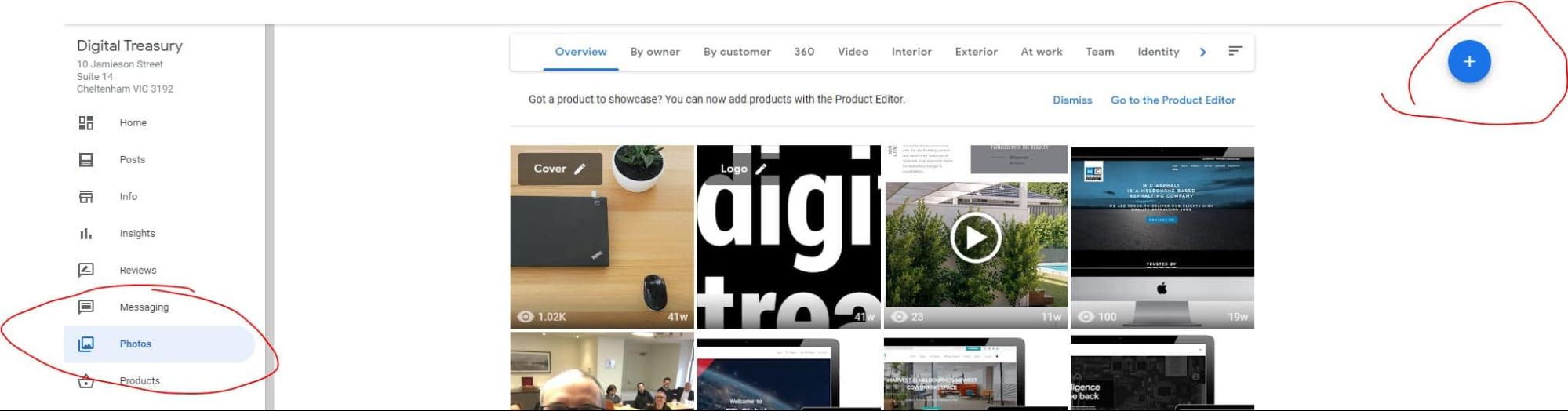
Upload Quality Photos and Videos
Statistics show that customers are 42% more likely to visit a business if the listing has a photo. So ensure that you optimise your GBP listing by uploading a quality profile photo and cover photo. Also, include other general photos of your business, team, and work.
Your profile photo should aim to boost your brand recognition, while your cover photos should promote your brand's culture and personality.
Photo Requirements:
- Minimum 720px wide, 720px tall
- File format: JPG or PNG
- File size: between 10KB and 5MB
- Include photos of your storefront, interior, products, team, and logo
Collect GMB Reviews
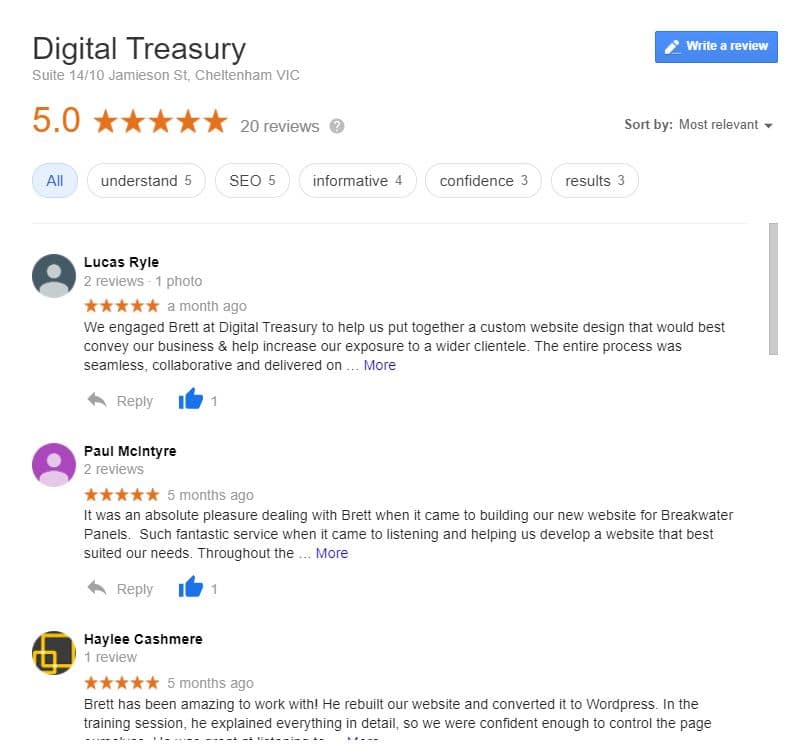
If you're observant, you'll have noticed that when you search for services or products online, business results display maps and star ratings. Reviews not only determine your ranking but also influence whether users will click on your website.
Gather reviews and ensure that they're genuine. The more positive reviews your business has, the higher it will rank on local search results.
Review Collection Strategy:
- Ask satisfied customers directly
- Follow up after successful projects
- Respond to all reviews professionally
- Aim for consistent review acquisition over time
Post Regular Updates and Images
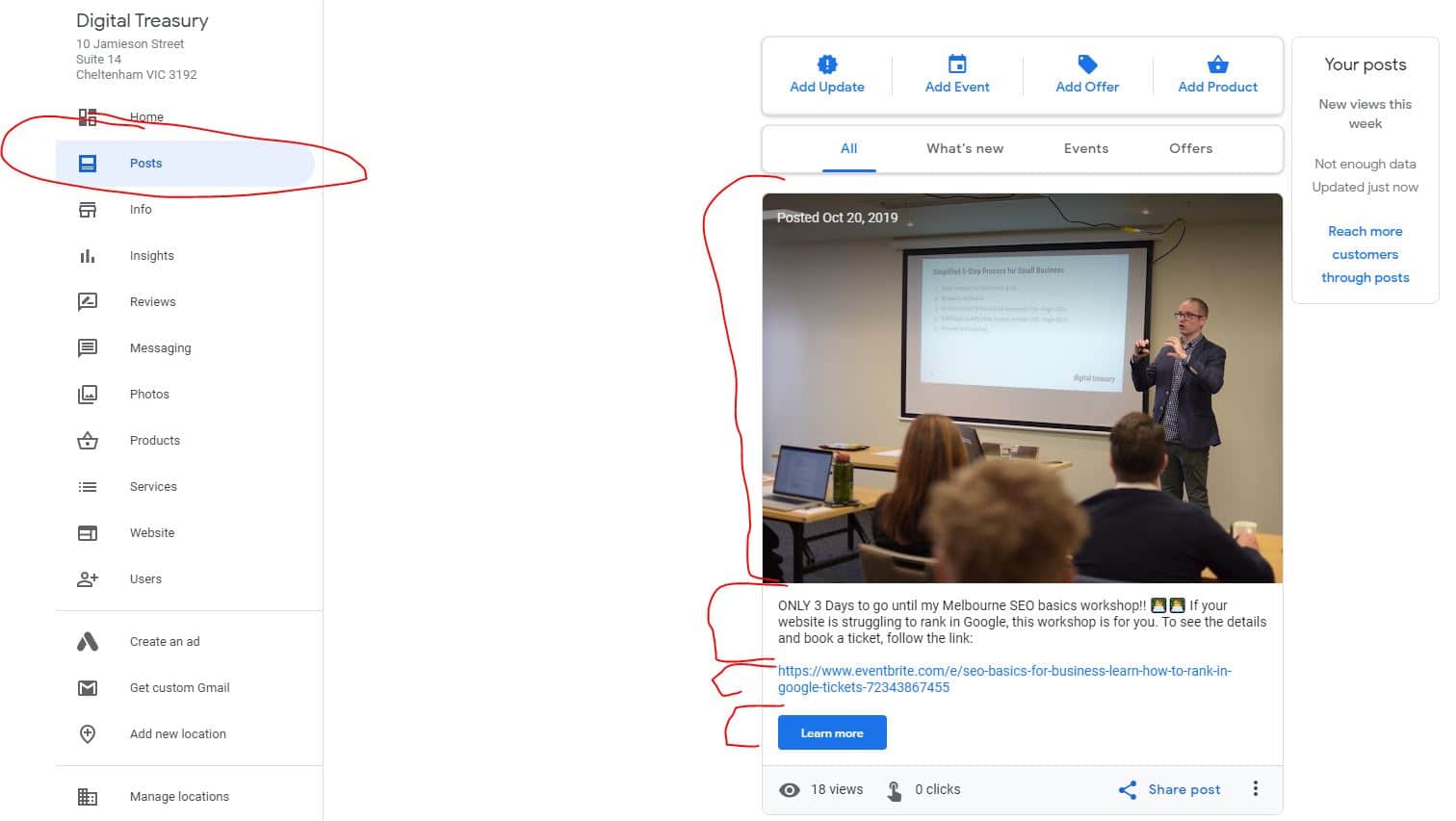
Use GBP to create events, make announcements, run promotions and highlight your products and services. Ensure that you post information that's relevant, engaging and informative to make customers choose you over your competitors.
Regular posting signals to Google that your business is active and current, which can improve your local search visibility.
Utilise the Q&A Feature
Google Maps now offers Q&A features. This means that anyone can ask a question and anyone can respond to those questions. Create a Q&A section to make it easier for your clients to know more about your business and the products and services your business offers.
Q&A Best Practices:
- Anticipate common customer questions
- Provide detailed, helpful answers
- Include relevant keywords naturally
- Monitor and respond to new questions promptly
Step 3: Embed Google Map on Your Website
Another excellent way to improve your ranking on Google Maps is to insert a Google map on your website's contact page. Embedding a Google map on your website is a great way of informing Google that your business is located where your listing says it is.
It also helps customers stay engaged with your business and learn where to find it. Anything you can do to make it easy for customers to find your business is worth doing.
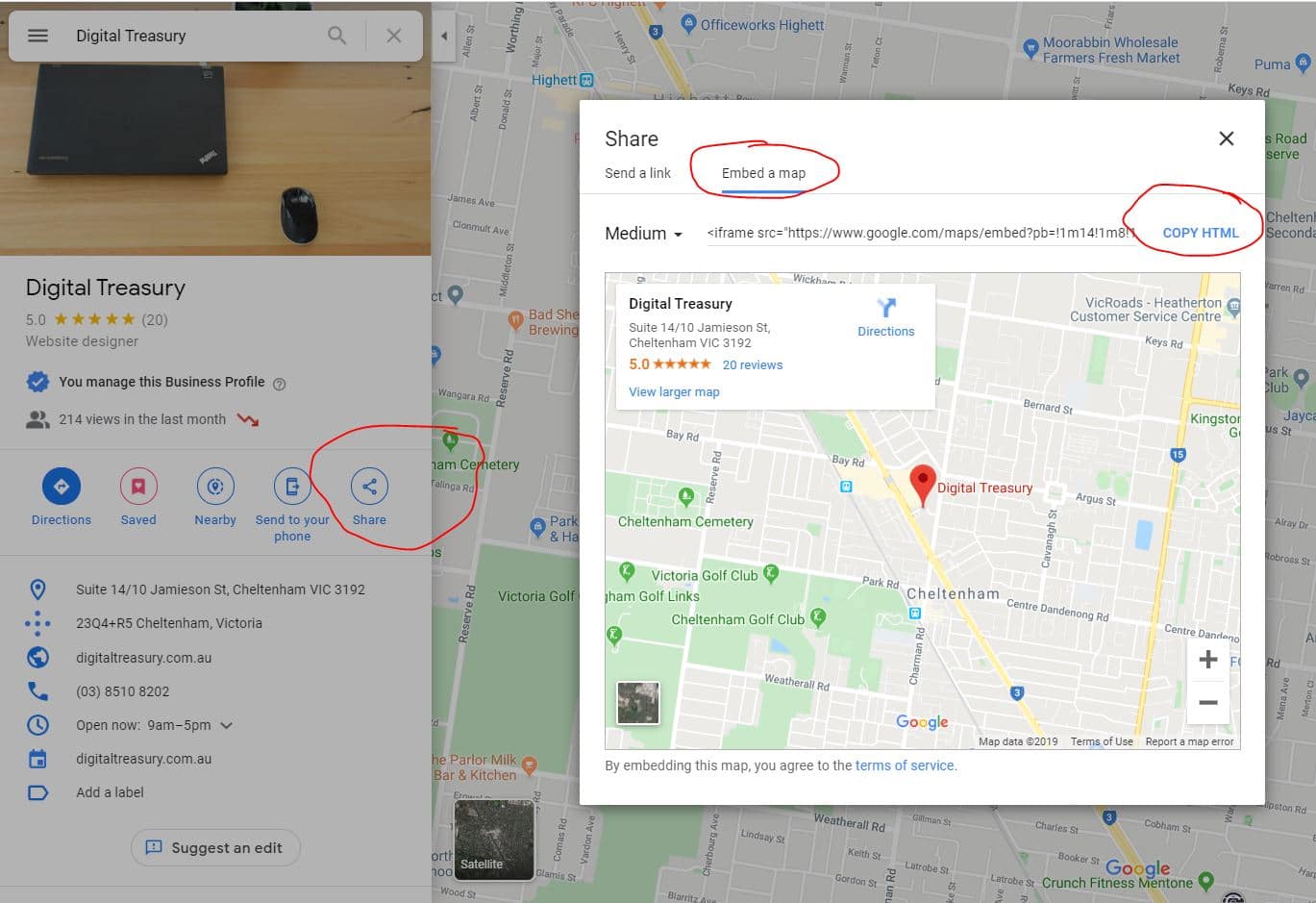
How to Embed Google Maps:
- Search your business name on Google Maps
- Click the share button
- Choose the "Embed a map" tab
- Copy and paste that code on your website's contact page
Ensure that you use the exact address that you have on your GBP listing when embedding a Google map on your website. This consistency supports your overall local SEO optimisation strategy.
Step 4: Claim and Verify Apple Maps and Bing Places
Claiming and verifying Apple Maps and Bing Places can give you a competitive advantage. Apple Maps usually pulls much of its data from directory sites like Yelp and other major data aggregator sites. So before claiming and verifying the listing on Apple Maps, it's crucial to ensure that the information provided is accurate.
Claiming Bing Places can also help boost your Google Maps ranking. Bing Places listings can be claimed via phone verification. However, in some cases, it may require postcard verification.
Additional Platform Benefits:
- Increased overall online presence
- More citation sources for local SEO
- Additional customer touchpoints
- Improved local search authority
When claiming Bing Places listings, ensure that the information provided is accurate. Also, don't forget to add identifying photos.
Step 5: Create Consistent Business Directory Listings
A major factor that determines your local ranking is the quality and quantity of your directory listings and your NAP consistency. NAP means name, address, and phone number. This feature is critical for any business that wants to rank highly on Google's local search.
People usually refer to the occurrence of NAP information on the web as a citation. A citation is when your business NAP information appears on blog posts, newspaper articles, and directory sites.
Why NAP Consistency Matters
Out of the foundational ranking factors for local search, several are related to citation quality, quantity, and consistency. When determining rankings, Google scans the web to check for mentions of your business NAP, URL and other crucial information. It then compares that data to other sources, including information provided by major data providers.
If the information is correct and consistent, Google will boost your ranking. Inconsistent information can harm your local search performance.
Key Directory Sites to Target:
- True Local
- Yellow Pages Australia
- Yelp
- Hotfrog
- White Pages
- Industry-specific directories
Your Action Plan for Better Google Maps Rankings
Now you should have a solid understanding of what it takes to give your GBP a ranking boost and improve your overall local search presence.
Quick Recap Checklist:
- Research location-based keywords - find the keywords customers are using to find businesses in your location
- Optimise your GBP listing for the keywords you found, ensuring complete and accurate business information for local business success
- Embed the GBP map on your actual website
- Get your business verified on Bing and Apple Maps
- Create consistent business directory listings across relevant platforms
- Maintain ongoing optimisation with regular posts, review responses, and profile updates
Remember, local search optimisation is an ongoing process. Regular monitoring and updates to your listings will help maintain and improve your rankings over time.
By following these steps systematically, you'll be well on your way to dominating the local search results in your area and attracting more qualified leads to your business.
Reach out to our team if you are unsure where to start. We are available for a consultation to discuss your business needs!


